Visual Studio style Editable List Box
 BCGControlBar Pro (MFC)
 BCGSuite (MFC)
BCGControlBar for .NET
The Visual Studio-like Editable List Box extends the functionality of the Windows list control. This component has the following advanced features allowing the easy management of the items list:
- Insert, Delete, Move Up and Move Down buttons. They allow you to add or delete the items and modify their order.
- Custom buttons.
- Control caption (on the left side of the buttons row).
- Item name editing.
- An optional in-place push button appeared on the right of the selected item.
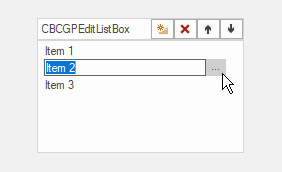
Sample code:
CBCGEditListBox m_wndEditListBox;
...
// Enable "New". "Delete", "Up" and "Down" buttons:
m_wndEditListBox.SetStandardButtons();

// Enable "Browse" (...) button:
m_wndEditListBox.EnableBrowseButton();

// Fill the list:
m_wndEditListBox.AddItem(_T("Item 1"));
m_wndEditListBox.AddItem(_T("Item 2"));
m_wndEditListBox.AddItem(_T("Item 3"));