Toolbar Edit Box with Spin Button and Calculator
 BCGControlBar Pro (MFC)
 BCGSuite (MFC)
BCGControlBar for .NET
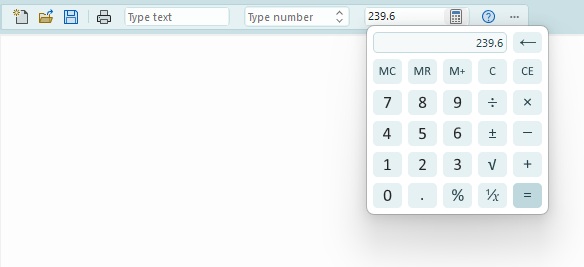
You can embed any type of control into a toolbar button. Toolbar edit box buttons with spin button control and popup calculator are supported out-of-the-box.
Toolbar button with a dropped-down calculator:
Sample code:
CBCGPToolbarEditBoxButton editButton1 (ID_EDIT_1,
	CImageHash::GetImageOfCommand (ID_EDIT_1, FALSE),
	ES_AUTOHSCROLL, 100);
m_wndToolBar.ReplaceButton (ID_EDIT_1, editButton1);

CBCGPToolbarSpinEditBoxButton editButton2 (ID_EDIT_2,
	CImageHash::GetImageOfCommand (ID_EDIT_2, FALSE),
	ES_AUTOHSCROLL, 100);
m_wndToolBar.ReplaceButton (ID_EDIT_2, editButton2);

CBCGPToolbarEditBoxButton editButton3 (ID_EDIT_3,
	CImageHash::GetImageOfCommand (ID_EDIT_3, FALSE),
	ES_AUTOHSCROLL, 100);
editButton3.EnableCalculator ();
m_wndToolBar.ReplaceButton (ID_EDIT_3, editButton3);