Visual Studio style Auto Hide Control Bars
 BCGControlBar Pro (MFC)
 BCGSuite (MFC)
BCGControlBar for .NET
The library provides an "Auto Hide Window" feature that allows you to display more information using less screen space by hiding or showing windows on your application's workspace. This technology is similar to the Visual Studio and Microsoft Visio application environments. Your workspace area is fully manageable!
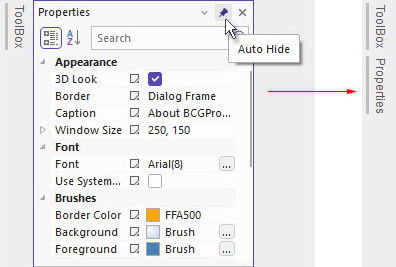
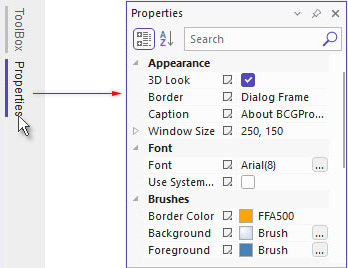
- When you press the pin button located on the docking pane caption, the window will hide away. It slides out and becomes visible when you mouse over it.
- If you want your auto-hide window to stay visible after it has slid out, just press the pin button.
- "Auto hide all" feature. If you have several docking control bars in a container and press the pin button while holding the Ctrl key, all control bars residing in this container will be switched to auto-hide mode.
- You can enable or disable animation when docking control bars are being switched to/from auto-hide mode.
- There is an ability to control animation speed for auto-hide bars.
User clicks "Auto Hide" button on the control bar caption and bar collapses to the side bar:
Hold mouse pointer on the "Properties" side button and "Properties" control bar is appear:
Sample code:
int CMainFrame::OnCreate(LPCREATESTRUCT lpCreateStruct)
{
...
    EnableAutoHideBars(CBRS_ALIGN_ANY);
}